
Connect sources and import documents
The Dashboard has two ways to bring outside knowledge into Signet:
- Connect a source when another system remains the canonical home of the knowledge. Examples include an Obsidian vault, a GitHub repository, or a Discord guild.
- Import files when you want Signet to create a durable, read-only source artifact from one or more documents.
Both paths preserve provenance. Signet indexes source-owned artifacts and searchable chunks in its own database. It does not write back to an Obsidian vault, GitHub, or Discord, and imported uploads are not retained as raw upload bytes.
For the complete source model and CLI/API options, see Sources and Documents and sources API.
Open Sources in the Dashboard
Section titled “Open Sources in the Dashboard”Start the daemon, then open the Dashboard:
signet daemon startsignet dashboardYou can also open http://localhost:3850 directly while the daemon is running.
Choose Sources in the left navigation. The page shows aggregate artifact,
chunk, and indexed counts, followed by Import files, Connect a source,
and cards for existing sources.
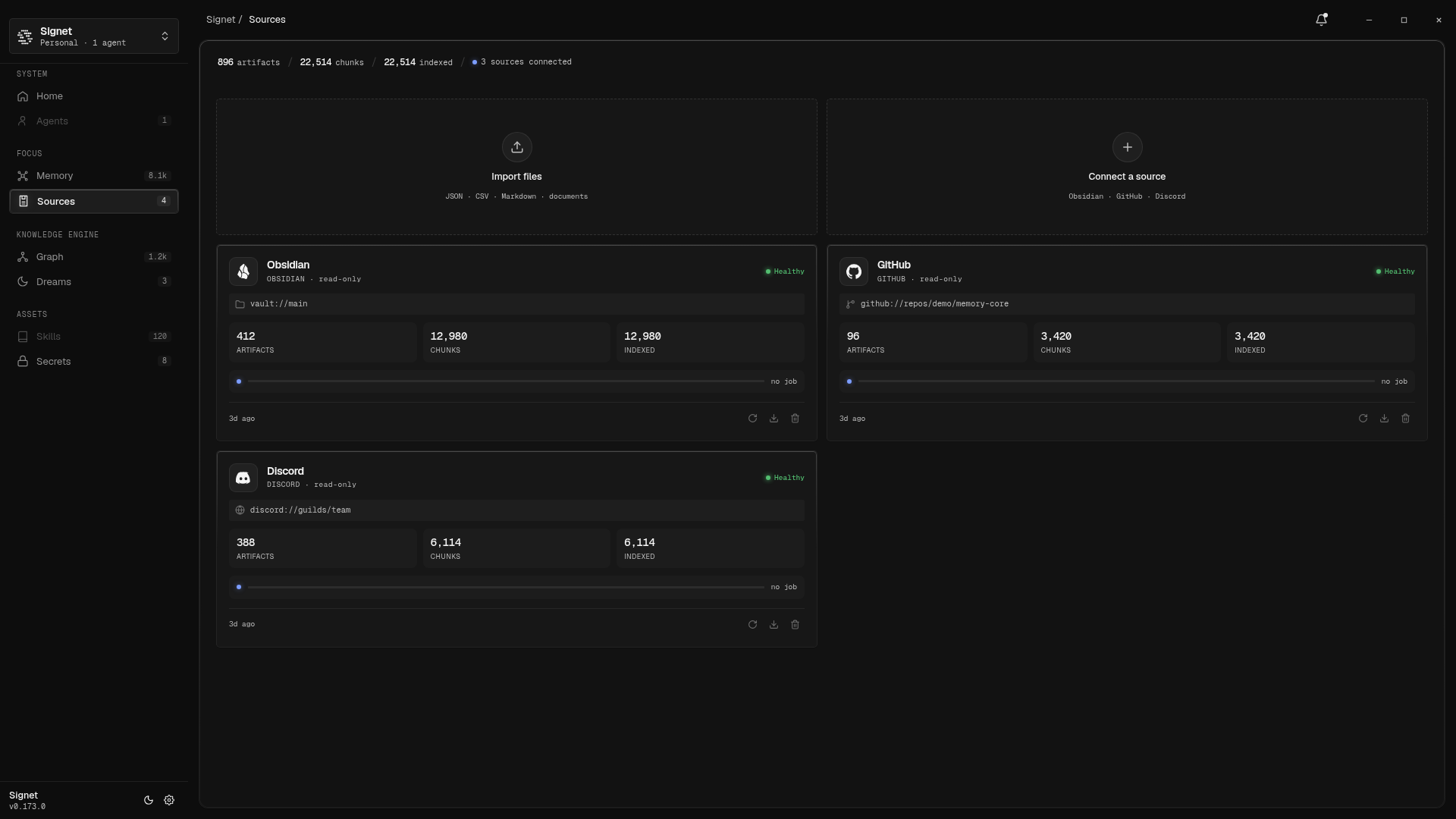
The screenshots in this guide use the Dashboard’s controlled demo build. The layout and controls are the current Dashboard UI, while the visible source names and paths are demo-safe values.
Connect a read-only source
Section titled “Connect a read-only source”- On Sources, choose Connect a source.
- Select Obsidian, GitHub, or Discord.
- Fill in the fields for the selected connector.
- Choose Connect & index.
- Return to the source card and watch the index job and health state.
Obsidian
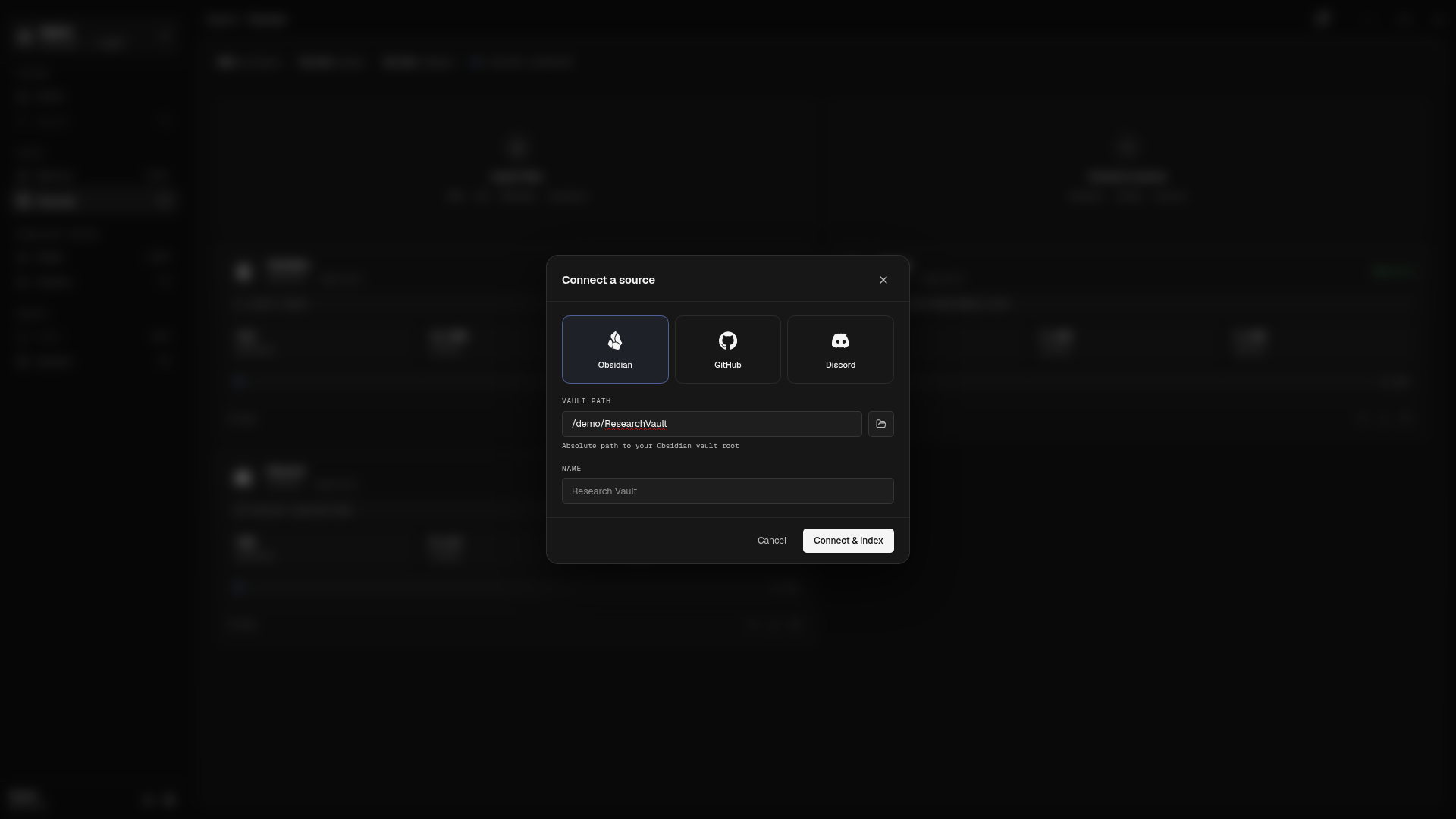
Section titled “Obsidian”The current Dashboard form asks for:
- Vault path: an absolute path to an existing directory. Browse folders can use a native picker in the desktop app. In browser/dev mode, the daemon picker is best-effort and may be unavailable.
- Name: an optional display name.
The Dashboard form does not currently expose exclude globs. Use the CLI or HTTP API reference when you need additional ignore patterns. Signet adds its standard exclusions for Obsidian internals, trash, Hermes metadata, and hidden files. The vault itself remains untouched.
GitHub
Section titled “GitHub”The current Dashboard form asks for:
- Repository:
owner/repoorowner/*. - Name: an optional display name.
- Token ref: optional for the default public REST-fetchable resources, and required for discussions. Enter the name of a Signet secret or external secret reference, never the token value.
Without a token reference, GitHub defaults to issues, pull requests, and selected Markdown docs. With a token reference, discussions can be included by using the API or source configuration reference. The current Dashboard form uses the connector defaults; it does not expose resource type, state, label, doc-path, or item-cap fields.
Discord
Section titled “Discord”The current Dashboard form asks for:
- Guild ID: a 17–20 digit Discord snowflake.
- Name: an optional display name.
- Token ref: required for this Dashboard path. Enter a Signet secret name,
such as
DISCORD_BOT_TOKEN, or another supported secret reference. Do not paste a raw bot token.
The current Dashboard form submits the default Discord REST configuration. It does not expose channel filters, message limits, attachment options, date bounds, gateway tailing, or desktop-cache mode. Use the Sources and Documents and sources API references for those advanced configurations.
After connecting
Section titled “After connecting”Connectors return immediately with an index job queued in the background. A source card can show:
queued…while the job waits;- a percentage and the path currently being scanned while it runs;
indexed Nafter completion; orerrorif the job failed.
The card also reports Healthy, Degraded, Unhealthy, or Empty. A
successful connection is not the same as a healthy completed index, so wait for
the job state and inspect the card’s health indicator.
Import local documents
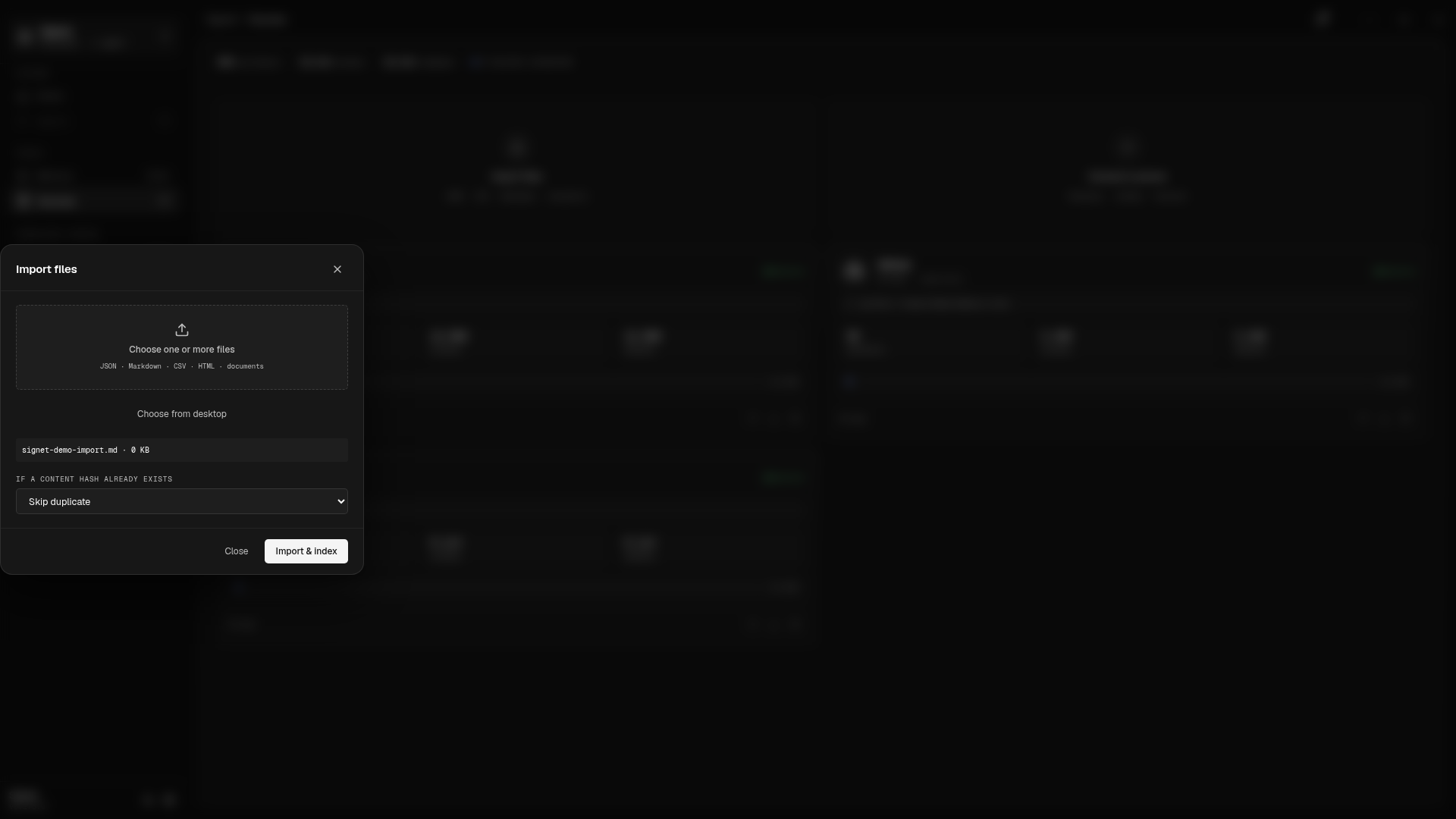
Section titled “Import local documents”- On Sources, choose Import files.
- Choose Choose one or more files to upload through the browser, or choose Choose from desktop to ask a local desktop daemon for native file paths.
- Select the duplicate policy.
- Choose Import & index.
- Read the per-file result in the dialog, then close it and refresh the Sources view if needed.
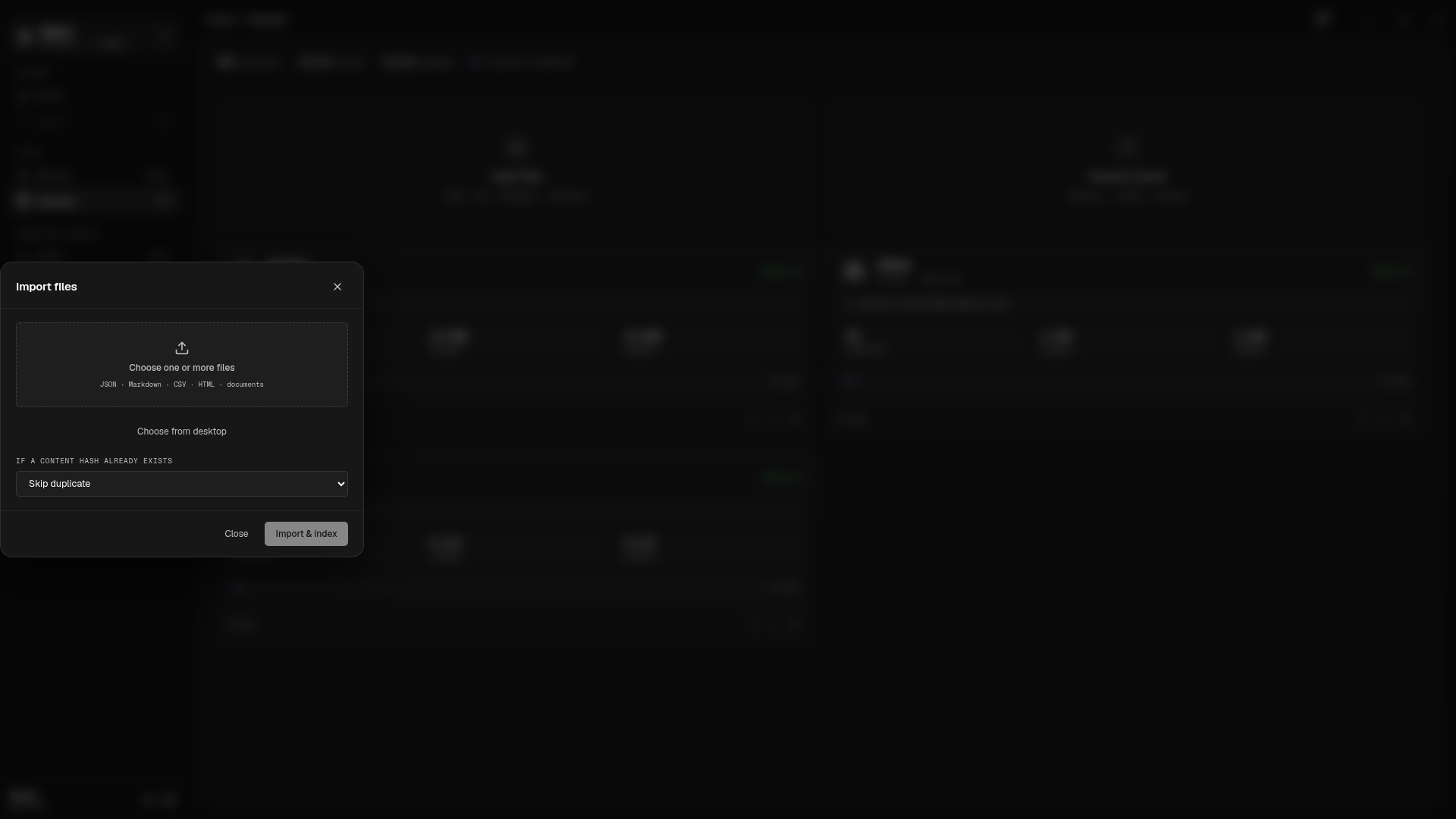
The browser path sends file bytes as a multipart upload. The desktop path sends filesystem paths only to a loopback daemon, which reads them locally. A remote Dashboard must use browser uploads; it cannot ask a remote daemon to read a path from your computer.
The importer accepts:
- text and Markdown:
.txt,.text,.md,.markdown; .json,.html,.htm, and.csv;- AnyDoc-backed documents:
.doc,.docx,.docm,.odt,.rtf,.pdf,.ppt,.pptx,.ppsx,.odp,.epub,.xls,.xlsx,.xlsm, and.ods.
The safety bounds are 25 files per request, 25 MiB per file, and 100 MiB per batch. Empty, unsupported, malformed, or over-limit files fail individually. A mixed batch can therefore import some files while reporting failures for the rest.
Duplicate handling
Section titled “Duplicate handling”The If a content hash already exists menu has three choices:
- Skip duplicate: keep the existing imported source.
- Replace and re-index: index the new normalized content and retire the replaced imported source.
- Import as a new source: keep both imports as separate sources.
The comparison uses normalized content hashes, not only filenames. The dialog
reports indexed, duplicate, or a concrete failure for each file. While the
request is active it shows Importing N files…; the importer does not expose a
separate long-running progress bar. After a successful response, the Sources
page shows the imported source as a compact card with its kind, source root,
health, artifact/chunk/indexed counts, and last-indexed time.
Imported representations are source-backed:
- JSON keeps a structured canonical representation plus a searchable projection.
- CSV remains one table artifact and also gets bounded row-range search chunks.
- Office, presentation, spreadsheet, PDF, and e-book formats become a Markdown projection through AnyDoc.
- Each result keeps the original filename, normalized format, content hash, and converter/projection metadata as provenance.
Source-backed recall is available after indexing. Semantic graph refinement is queued asynchronously as a hygiene Dreaming attention; it does not change the canonical imported artifact.
Inspect, refresh, and remove
Section titled “Inspect, refresh, and remove”Use the source card as the first operational view:
- The health label and failure count show the latest source diagnostics.
- The progress strip shows the current connector index job.
- Re-index submits the source configuration again and queues a fresh job.
- Snapshot downloads a source-owned JSON snapshot. Discord Desktop local
@meartifacts are excluded by default. - Remove asks for confirmation, then removes the source configuration and purges Signet-owned source artifacts, graph rows, and source chunk embeddings.
Removing a source never deletes or modifies the original source files. For import replacement/removal, derived provenance remains marked unsupported and is queued for hygiene review rather than being silently erased.
The Dashboard refreshes the source list every 30 seconds. Use the browser
refresh or navigate away and back when you need an immediate list refresh.
For endpoint-level diagnostics, use GET /api/sources/:sourceId/health and the
HTTP API reference.
Troubleshooting
Section titled “Troubleshooting”The Dashboard says the daemon is unavailable
Section titled “The Dashboard says the daemon is unavailable”Check the daemon and its health endpoint:
signet daemon statuscurl -fsS http://localhost:3850/healthStart or restart it if needed:
signet daemon startsignet daemon restartIf the Dashboard was opened on a non-default port, use the URL matching your
SIGNET_PORT setting.
The folder or file picker does not open
Section titled “The folder or file picker does not open”Native pickers are local-only and best-effort. The directory picker can return
501 when no supported OS picker is installed. For imports, use browser upload
with Choose one or more files. For a source path, paste an absolute path
into the Obsidian field and confirm that the directory exists on the daemon’s
machine.
An import is already present
Section titled “An import is already present”Choose Skip duplicate to keep the existing source, Replace and re-index to retire it and index the new normalized content, or Import as a new source to keep both. A duplicate is based on normalized content, so renaming the same content does not make it new under the skip policy.
Indexing is not progressing
Section titled “Indexing is not progressing”Check the source card’s progress strip and health label, then choose Re-index once the current job has settled. If the card reports an error, inspect the source health endpoint and daemon logs:
curl -fsS http://localhost:3850/api/sourcescurl -fsS http://localhost:3850/api/sources/<source-id>/healthsignet daemon logs -n 100For Discord or GitHub, verify the referenced secret exists and that the connector’s access is sufficient. For an imported file, read the per-file error in the import dialog; unsupported formats, empty content, conversion failures, and file-size limits are reported there instead of being hidden by successful files in the same batch.